
This Blog is moved to http://www.oracleappselearn.blogspot.com
Sorry for the inconvenience
Saturday, July 2, 2011


Wednesday, April 6, 2011
PO Line Cancel
Po Line which the organizations no longer wanted to receive an Invoice from the Supplier should be cancelled to avoid any open Commitments to the Project PO Line is associated with, and In cancelling the PO line it could raise an error as below,
"Line # Shipment # Quantity Billed # greated than Quantity received #".
The problem could be that the PO Line is Matched ina 3-Way Functionality, and inroder to cancel the line that has been billed and not received, the line should have match approval level set to "2-Way" so that it does not expect any receipt by setting the receipt_required_flag='N'.
If Match Approval Level is 3-way or 4-way, application checks whether any of the shipments on PO or Release is having billed quantity greater than received or delivered quantity. If so, user is restricted from canceling the PO or the Release.
Process to Cancel the PO Line,
1. Query the PO in PO Summary Form.
2. Query the Line to Cancel
3. Go to Tools --> Control --> Cancel the PO Line.
Print This Post
"Line # Shipment # Quantity Billed # greated than Quantity received #".
The problem could be that the PO Line is Matched ina 3-Way Functionality, and inroder to cancel the line that has been billed and not received, the line should have match approval level set to "2-Way" so that it does not expect any receipt by setting the receipt_required_flag='N'.
If Match Approval Level is 3-way or 4-way, application checks whether any of the shipments on PO or Release is having billed quantity greater than received or delivered quantity. If so, user is restricted from canceling the PO or the Release.
Process to Cancel the PO Line,
1. Query the PO in PO Summary Form.
2. Query the Line to Cancel
3. Go to Tools --> Control --> Cancel the PO Line.
Print This Post
Thursday, January 13, 2011
Transaction Controls in Projects
This section briefs about the Transaction Controls that can be used for a Project. We have 2 types of Transaction Controls to be implemented to a Project as listed below,
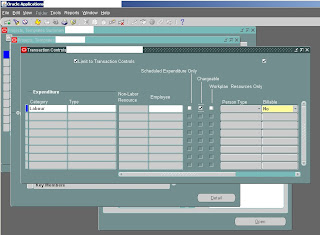
Inclusive Transaction Controls: Inclusive transaction controls limit charges to only the transaction controls entered; Oracle Projects then rejects any charges that are not listed as chargeable in the transaction controls. You make your transaction controls inclusive by checking the Limit to Transaction Controls box on the Transaction Controls window. Herein is the example screenshot where we allow only Labour Charges for the Project ‘P1’ and Task ‘T1’.
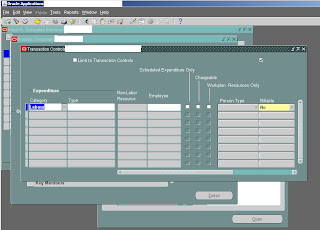
Exclusive transaction controls: Exclusive transaction controls allow all charges except those that are specified as non-chargeable in the transaction controls. Oracle Projects
defaults to exclusive transaction controls, and Limit to Transaction Controls is Unchecked as below,
Print This Post
Inclusive Transaction Controls: Inclusive transaction controls limit charges to only the transaction controls entered; Oracle Projects then rejects any charges that are not listed as chargeable in the transaction controls. You make your transaction controls inclusive by checking the Limit to Transaction Controls box on the Transaction Controls window. Herein is the example screenshot where we allow only Labour Charges for the Project ‘P1’ and Task ‘T1’.

Exclusive transaction controls: Exclusive transaction controls allow all charges except those that are specified as non-chargeable in the transaction controls. Oracle Projects
defaults to exclusive transaction controls, and Limit to Transaction Controls is Unchecked as below,

Print This Post
Tuesday, January 11, 2011
My Useful Queries
I use the following queries very frequently on my use of Oracle E-Business suite 11i,
1. Identify Buyers without a Position assigned if using Position Hierarchy
SELECT paf.person_id, ppf.full_name
FROM per_all_assignments_f paf
,po_agents poa
,per_people_f ppf
,per_assignment_status_types past
WHERE trunc(sysdate) between TRUNC(paf.effective_start_date) AND TRUNC(paf.effective_end_date)
AND paf.person_id = poa.agent_id
AND paf.person_id = ppf.person_id
AND TRUNC(sysdate) between TRUNC(ppf.effective_start_date) and TRUNC(ppf.effective_end_date)
AND paf.position_id is null
AND paf.job_id is not null
AND paf.assignment_status_type_id = past.assignment_status_type_id
AND past.user_status = 'Active Assignment'
AND TRUNC(sysdate) between TRUNC(poa.start_date_active) AND TRUNC(NVL(poa.end_date_active, sysdate))
ORDER BY paf.person_id;
2. Retrive Timecard details with Resource, and Timecard Start time and End Time
SELECT DISTINCT PP.SEGMENT1 "Project Number", PT.TASK_NUMBER "Task number", HTA.ATTRIBUTE3, DAY.START_TIME, DET.MEASURE, DET.APPROVAL_STATUS, DET.COMMENT_TEXT
FROM
(SELECT TIME_BUILDING_BLOCK_ID,
PARENT_BUILDING_BLOCK_ID ,
PARENT_BUILDING_BLOCK_OVN ,
OBJECT_VERSION_NUMBER ,
MEASURE ,
RESOURCE_ID ,
APPROVAL_STATUS ,
COMMENT_TEXT, TRANSLATION_DISPLAY_KEY
FROM HXC_TIME_BUILDING_BLOCKS
WHERE SCOPE = 'DETAIL'
) DET ,
(SELECT TIME_BUILDING_BLOCK_ID,
PARENT_BUILDING_BLOCK_ID ,
PARENT_BUILDING_BLOCK_OVN ,
OBJECT_VERSION_NUMBER ,
START_TIME ,
APPROVAL_STATUS, RESOURCE_ID
FROM HXC_TIME_BUILDING_BLOCKS
WHERE SCOPE = 'DAY'
) DAY ,
(SELECT TIME_BUILDING_BLOCK_ID,
START_TIME ,
APPROVAL_STATUS ,
OBJECT_VERSION_NUMBER ,
COMMENT_TEXT, RESOURCE_ID
FROM HXC_TIME_BUILDING_BLOCKS
WHERE SCOPE = 'TIMECARD'
) TC
,HXC_TIME_ATTRIBUTE_USAGES HTAU
,HXC_TIME_ATTRIBUTES HTA
,PA_PROJECTS_ALL PP
,PA_TASKS PT
WHERE DAY.PARENT_BUILDING_BLOCK_ID = TC.TIME_BUILDING_BLOCK_ID
AND DAY.PARENT_BUILDING_BLOCK_OVN = TC.OBJECT_VERSION_NUMBER
AND DET.PARENT_BUILDING_BLOCK_ID = DAY.TIME_BUILDING_BLOCK_ID
AND DET.PARENT_BUILDING_BLOCK_OVN = DAY.OBJECT_VERSION_NUMBER
AND TRUNC(DAY.START_TIME) BETWEEN &START_TIME AND &END_TIME
AND DAY.RESOURCE_ID = &resource_id
AND TC.OBJECT_VERSION_NUMBER =
(SELECT MAX(OBJECT_VERSION_NUMBER)
FROM HXC_TIME_BUILDING_BLOCKS
WHERE SCOPE = 'TIMECARD'
AND TIME_BUILDING_BLOCK_ID = TC.TIME_BUILDING_BLOCK_ID
)
AND DET.OBJECT_VERSION_NUMBER =
(SELECT MAX(OBJECT_VERSION_NUMBER)
FROM HXC_TIME_BUILDING_BLOCKS
WHERE SCOPE = 'DETAIL'
AND TIME_BUILDING_BLOCK_ID = DET.TIME_BUILDING_BLOCK_ID
)
AND DET.TIME_BUILDING_BLOCK_ID = HTAU.TIME_BUILDING_BLOCK_ID
AND DET.OBJECT_VERSION_NUMBER = HTAU.TIME_BUILDING_BLOCK_OVN
AND HTAU.TIME_ATTRIBUTE_ID = HTA.TIME_ATTRIBUTE_ID
AND HTA.ATTRIBUTE1 = TO_CHAR(PP.PROJECT_ID)
AND HTA.ATTRIBUTE2 = TO_CHAR(PT.TASK_ID)
AND HTA.ATTRIBUTE5 = 'ST'
ORDER BY 4 ;
Print This Post
1. Identify Buyers without a Position assigned if using Position Hierarchy
SELECT paf.person_id, ppf.full_name
FROM per_all_assignments_f paf
,po_agents poa
,per_people_f ppf
,per_assignment_status_types past
WHERE trunc(sysdate) between TRUNC(paf.effective_start_date) AND TRUNC(paf.effective_end_date)
AND paf.person_id = poa.agent_id
AND paf.person_id = ppf.person_id
AND TRUNC(sysdate) between TRUNC(ppf.effective_start_date) and TRUNC(ppf.effective_end_date)
AND paf.position_id is null
AND paf.job_id is not null
AND paf.assignment_status_type_id = past.assignment_status_type_id
AND past.user_status = 'Active Assignment'
AND TRUNC(sysdate) between TRUNC(poa.start_date_active) AND TRUNC(NVL(poa.end_date_active, sysdate))
ORDER BY paf.person_id;
2. Retrive Timecard details with Resource, and Timecard Start time and End Time
SELECT DISTINCT PP.SEGMENT1 "Project Number", PT.TASK_NUMBER "Task number", HTA.ATTRIBUTE3, DAY.START_TIME, DET.MEASURE, DET.APPROVAL_STATUS, DET.COMMENT_TEXT
FROM
(SELECT TIME_BUILDING_BLOCK_ID,
PARENT_BUILDING_BLOCK_ID ,
PARENT_BUILDING_BLOCK_OVN ,
OBJECT_VERSION_NUMBER ,
MEASURE ,
RESOURCE_ID ,
APPROVAL_STATUS ,
COMMENT_TEXT, TRANSLATION_DISPLAY_KEY
FROM HXC_TIME_BUILDING_BLOCKS
WHERE SCOPE = 'DETAIL'
) DET ,
(SELECT TIME_BUILDING_BLOCK_ID,
PARENT_BUILDING_BLOCK_ID ,
PARENT_BUILDING_BLOCK_OVN ,
OBJECT_VERSION_NUMBER ,
START_TIME ,
APPROVAL_STATUS, RESOURCE_ID
FROM HXC_TIME_BUILDING_BLOCKS
WHERE SCOPE = 'DAY'
) DAY ,
(SELECT TIME_BUILDING_BLOCK_ID,
START_TIME ,
APPROVAL_STATUS ,
OBJECT_VERSION_NUMBER ,
COMMENT_TEXT, RESOURCE_ID
FROM HXC_TIME_BUILDING_BLOCKS
WHERE SCOPE = 'TIMECARD'
) TC
,HXC_TIME_ATTRIBUTE_USAGES HTAU
,HXC_TIME_ATTRIBUTES HTA
,PA_PROJECTS_ALL PP
,PA_TASKS PT
WHERE DAY.PARENT_BUILDING_BLOCK_ID = TC.TIME_BUILDING_BLOCK_ID
AND DAY.PARENT_BUILDING_BLOCK_OVN = TC.OBJECT_VERSION_NUMBER
AND DET.PARENT_BUILDING_BLOCK_ID = DAY.TIME_BUILDING_BLOCK_ID
AND DET.PARENT_BUILDING_BLOCK_OVN = DAY.OBJECT_VERSION_NUMBER
AND TRUNC(DAY.START_TIME) BETWEEN &START_TIME AND &END_TIME
AND DAY.RESOURCE_ID = &resource_id
AND TC.OBJECT_VERSION_NUMBER =
(SELECT MAX(OBJECT_VERSION_NUMBER)
FROM HXC_TIME_BUILDING_BLOCKS
WHERE SCOPE = 'TIMECARD'
AND TIME_BUILDING_BLOCK_ID = TC.TIME_BUILDING_BLOCK_ID
)
AND DET.OBJECT_VERSION_NUMBER =
(SELECT MAX(OBJECT_VERSION_NUMBER)
FROM HXC_TIME_BUILDING_BLOCKS
WHERE SCOPE = 'DETAIL'
AND TIME_BUILDING_BLOCK_ID = DET.TIME_BUILDING_BLOCK_ID
)
AND DET.TIME_BUILDING_BLOCK_ID = HTAU.TIME_BUILDING_BLOCK_ID
AND DET.OBJECT_VERSION_NUMBER = HTAU.TIME_BUILDING_BLOCK_OVN
AND HTAU.TIME_ATTRIBUTE_ID = HTA.TIME_ATTRIBUTE_ID
AND HTA.ATTRIBUTE1 = TO_CHAR(PP.PROJECT_ID)
AND HTA.ATTRIBUTE2 = TO_CHAR(PT.TASK_ID)
AND HTA.ATTRIBUTE5 = 'ST'
ORDER BY 4 ;
Print This Post
Monday, September 20, 2010
Changing an Internal Name of a Workflow Item Type
For changing a Workflow Internal name of an Item Type, use wfchitt.sql located at $FND_TOP/sql and the syntax is as below,
sqlplus usr/pwd @wfchitt.sql old_item_type new_item_type
Please refer to Oracle Administrator guide for further information on this.
Print This Post
sqlplus usr/pwd @wfchitt.sql
Please refer to Oracle Administrator guide for further information on this.
Print This Post
Monday, August 2, 2010
Concurrent Program Responsibility
The below query provides the Responsibility and REquest group associated with the provided concurrent program,
SELECT frg.request_group_name, frpt.responsibility_name
FROM FND_CONCURRENT_PROGRAMS_TL fcpl
,FND_REQUEST_GROUP_UNITS frgu
,FND_REQUEST_GROUPS frg
,FND_RESPONSIBILITY frp
,FND_RESPONSIBILITY_TL frpt
WHERE fcpl.user_concurrent_program_name like 'Positions - Outstanding Receivables / Payables Report'
AND fcpl.language = USERENV('LANG')
AND fcpl.concurrent_program_id = frgu.request_unit_id
AND frgu.request_group_id = frg.request_group_id
AND frp.request_group_id = frg.request_group_id
AND frp.responsibility_id = frpt.responsibility_id
AND frpt.language = USERENV('LANG')
AND NVL(frp.end_date, SYSDATE) >= SYSDATE;
Print This Post
SELECT frg.request_group_name, frpt.responsibility_name
FROM FND_CONCURRENT_PROGRAMS_TL fcpl
,FND_REQUEST_GROUP_UNITS frgu
,FND_REQUEST_GROUPS frg
,FND_RESPONSIBILITY frp
,FND_RESPONSIBILITY_TL frpt
WHERE fcpl.user_concurrent_program_name like 'Positions - Outstanding Receivables / Payables Report'
AND fcpl.language = USERENV('LANG')
AND fcpl.concurrent_program_id = frgu.request_unit_id
AND frgu.request_group_id = frg.request_group_id
AND frp.request_group_id = frg.request_group_id
AND frp.responsibility_id = frpt.responsibility_id
AND frpt.language = USERENV('LANG')
AND NVL(frp.end_date, SYSDATE) >= SYSDATE;
Print This Post
Wednesday, July 14, 2010
Invoice By Bill Transaction Currency Checkbox update with 'FRM-40200: Field is protected against update'

We will be able to modify the 'Invoice By Bill Transaction Currency' Checkbox unless there is baselined funding on the Project and following conditions represent whether this flag is updateable, with the error 'FRM-40200: Field is protected against update',
Non-zero baselined funding amount exists for the project
SELECT sum(nvl(allocated_amount,0))
FROM PA_PROJECT_FUNDINGS
WHERE PROJECT_ID = &p_project_id
AND budget_type_code = 'BASELINE';
Draft funding lines exist for the project
SELECT 'Y'
FROM PA_PROJECT_FUNDINGS
WHERE PROJECT_ID = &p_project_id
AND budget_type_code = 'DRAFT';
PA events exist on the project
SELECT 'Y'
FROM dual
WHERE exists( SELECT project_id
FROM pa_events
WHERE project_id = &p_project_id);
Any expenditure items exist on the project
SELECT 'Y'
FROM dual
WHERE exists( SELECT T.project_id
FROM pa_expenditure_items_all E
, pa_tasks T
WHERE T.project_id = &p_project_id
AND E.task_id = T.task_id);
The project type is flagged for use in InterCompany Billing ( cc_prvdr_flag = 'Y') . This columns is found in pa_project_types_all
SELECT pt.cc_prvdr_flag
FROM pa_projects_all p
, pa_project_types_all
WHERE p.project_id = &p_project_id
AND pt.project_type = p.project_type
AND nvl(pt.org_id, -999) = nvl(p.org_id, -999);
And sometimes there could be a draft invoice being generated in the other than the transaction currency and we want to generate the draft invoice in the transaction currency, then we need to undo the Draft invoice update the 'Invoice By Bill Transaction Currency' Checkbox with the following query,
UPDATE pa_projects_all
SET INV_BY_BILL_TRANS_CURR_FLAG = 'N'
Saturday, June 5, 2010
OA Framework Errors
oracle.apps.fnd.framework.OAException: Application: FND, Message Name: FND_NO_REGION_DATA. Tokens: REGIONCODE = /xxc/oracle/apps/ak/employee/webui/EmployeePG; at oracle.apps.fnd.framework.webui.JRAD2AKMapper.getRootMElement(JRAD2AKMapper.java:529) at oracle.apps.fnd.framework.webui.OAWebBeanFactoryImpl.getWebBeanTypeDataFromJRAD(OAWebBeanFactoryImpl.java:3719) at oracle.apps.fnd.framework.webui.OAWebBeanFactoryImpl.getRootApplicationModuleClass(OAWebBeanFactoryImpl.java:3452) at oracle.apps.fnd.framework.webui.OAPageBean.preparePage(OAPageBean.java:1006) at oracle.apps.fnd.framework.webui.OAPageBean.preparePage(OAPageBean.java:509) at oracle.apps.fnd.framework.webui.OAPageBean.preparePage(OAPageBean.java:430) at _oa__html._OA._jspService(_OA.java:84) at oracle.jsp.runtime.HttpJsp.service(HttpJsp.java:119) at oracle.jsp.app.JspApplication.dispatchRequest(JspApplication.java:417) at oracle.jsp.JspServlet.doDispatch(JspServlet.java:267) at oracle.jsp.JspServlet.internalService(JspServlet.java:186) at oracle.jsp.JspServlet.service(JspServlet.java:156) at javax.servlet.http.HttpServlet.service(HttpServlet.java:588) at oracle.jsp.provider.Jsp20RequestDispatcher.forward(Jsp20RequestDispatcher.java:162) at oracle.jsp.runtime.OraclePageContext.forward(OraclePageContext.java:187) at _oa__html._RF._jspService(_RF.java:102) at oracle.jsp.runtime.HttpJsp.service(HttpJsp.java:119) at oracle.jsp.app.JspApplication.dispatchRequest(JspApplication.java:417) at oracle.jsp.JspServlet.doDispatch(JspServlet.java:267) at oracle.jsp.JspServlet.internalService(JspServlet.java:186) at oracle.jsp.JspServlet.service(JspServlet.java:156) at javax.servlet.http.HttpServlet.service(HttpServlet.java:588) at oracle.jsp.provider.Jsp20RequestDispatcher.forward(Jsp20RequestDispatcher.java:162) at oracle.jsp.runtime.OraclePageContext.forward(OraclePageContext.java:187) at _oa__html._OA._jspService(_OA.java:94) at oracle.jsp.runtime.HttpJsp.service(HttpJsp.java:119) at oracle.jsp.app.JspApplication.dispatchRequest(JspApplication.java:417) at oracle.jsp.JspServlet.doDispatch(JspServlet.java:267) at oracle.jsp.JspServlet.internalService(JspServlet.java:186) at oracle.jsp.JspServlet.service(JspServlet.java:156) at javax.servlet.http.HttpServlet.service(HttpServlet.java:588) at oracle.jsp.provider.Jsp20RequestDispatcher.forward(Jsp20RequestDispatcher.java:162) at oracle.jsp.runtime.OraclePageContext.forward(OraclePageContext.java:187) at _oa__html._OA._jspService(_OA.java:94) at oracle.jsp.runtime.HttpJsp.service(HttpJsp.java:119) at oracle.jsp.app.JspApplication.dispatchRequest(JspApplication.java:417) at oracle.jsp.JspServlet.doDispatch(JspServlet.java:267) at oracle.jsp.JspServlet.internalService(JspServlet.java:186) at oracle.jsp.JspServlet.service(JspServlet.java:156) at javax.servlet.http.HttpServlet.service(HttpServlet.java:588) at org.apache.jserv.JServConnection.processRequest(JServConnection.java:456) at org.apache.jserv.JServConnection.run(JServConnection.java:294) at java.lang.Thread.run(Thread.java:619) ## Detail 0 ##
Exception: oracle.adf.mds.MetadataDefException: Unable to find component with absolute reference = /xxc/oracle/apps/ak/employee/webui/EmployeePG, XML Path = null. Please verify that the reference is valid and the definition of the component exists either on the File System or in the MDS Repository. at oracle.adf.mds.internal.MetadataManagerBase.findElement(MetadataManagerBase.java:1350) at oracle.adf.mds.MElement.findElement(MElement.java:97) at oracle.apps.fnd.framework.webui.JRAD2AKMapper.getRootMElement(JRAD2AKMapper.java:503) at oracle.apps.fnd.framework.webui.OAWebBeanFactoryImpl.getWebBeanTypeDataFromJRAD(OAWebBeanFactoryImpl.java:3719) at oracle.apps.fnd.framework.webui.OAWebBeanFactoryImpl.getRootApplicationModuleClass(OAWebBeanFactoryImpl.java:3452) at oracle.apps.fnd.framework.webui.OAPageBean.preparePage(OAPageBean.java:1006) at oracle.apps.fnd.framework.webui.OAPageBean.preparePage(OAPageBean.java:509) at oracle.apps.fnd.framework.webui.OAPageBean.preparePage(OAPageBean.java:430) at _oa__html._OA._jspService(_OA.java:84) at oracle.jsp.runtime.HttpJsp.service(HttpJsp.java:119) at oracle.jsp.app.JspApplication.dispatchRequest(JspApplication.java:417) at oracle.jsp.JspServlet.doDispatch(JspServlet.java:267) at oracle.jsp.JspServlet.internalService(JspServlet.java:186) at oracle.jsp.JspServlet.service(JspServlet.java:156) at javax.servlet.http.HttpServlet.service(HttpServlet.java:588) at oracle.jsp.provider.Jsp20RequestDispatcher.forward(Jsp20RequestDispatcher.java:162) at oracle.jsp.runtime.OraclePageContext.forward(OraclePageContext.java:187) at _oa__html._RF._jspService(_RF.java:102) at oracle.jsp.runtime.HttpJsp.service(HttpJsp.java:119) at oracle.jsp.app.JspApplication.dispatchRequest(JspApplication.java:417) at oracle.jsp.JspServlet.doDispatch(JspServlet.java:267) at oracle.jsp.JspServlet.internalService(JspServlet.java:186) at oracle.jsp.JspServlet.service(JspServlet.java:156) at javax.servlet.http.HttpServlet.service(HttpServlet.java:588) at oracle.jsp.provider.Jsp20RequestDispatcher.forward(Jsp20RequestDispatcher.java:162) at oracle.jsp.runtime.OraclePageContext.forward(OraclePageContext.java:187) at _oa__html._OA._jspService(_OA.java:94) at oracle.jsp.runtime.HttpJsp.service(HttpJsp.java:119) at oracle.jsp.app.JspApplication.dispatchRequest(JspApplication.java:417) at oracle.jsp.JspServlet.doDispatch(JspServlet.java:267) at oracle.jsp.JspServlet.internalService(JspServlet.java:186) at oracle.jsp.JspServlet.service(JspServlet.java:156) at javax.servlet.http.HttpServlet.service(HttpServlet.java:588) at oracle.jsp.provider.Jsp20RequestDispatcher.forward(Jsp20RequestDispatcher.java:162) at oracle.jsp.runtime.OraclePageContext.forward(OraclePageContext.java:187) at _oa__html._OA._jspService(_OA.java:94) at oracle.jsp.runtime.HttpJsp.service(HttpJsp.java:119) at oracle.jsp.app.JspApplication.dispatchRequest(JspApplication.java:417) at oracle.jsp.JspServlet.doDispatch(JspServlet.java:267) at oracle.jsp.JspServlet.internalService(JspServlet.java:186) at oracle.jsp.JspServlet.service(JspServlet.java:156) at javax.servlet.http.HttpServlet.service(HttpServlet.java:588) at org.apache.jserv.JServConnection.processRequest(JServConnection.java:456) at org.apache.jserv.JServConnection.run(JServConnection.java:294) at java.lang.Thread.run(Thread.java:619)
Exception: oracle.adf.mds.MetadataDefException: Unable to find component with absolute reference = /xxc/oracle/apps/ak/employee/webui/EmployeePG, XML Path = null. Please verify that the reference is valid and the definition of the component exists either on the File System or in the MDS Repository. at oracle.adf.mds.internal.MetadataManagerBase.findElement(MetadataManagerBase.java:1350) at oracle.adf.mds.MElement.findElement(MElement.java:97) at oracle.apps.fnd.framework.webui.JRAD2AKMapper.getRootMElement(JRAD2AKMapper.java:503) at oracle.apps.fnd.framework.webui.OAWebBeanFactoryImpl.getWebBeanTypeDataFromJRAD(OAWebBeanFactoryImpl.java:3719) at oracle.apps.fnd.framework.webui.OAWebBeanFactoryImpl.getRootApplicationModuleClass(OAWebBeanFactoryImpl.java:3452) at oracle.apps.fnd.framework.webui.OAPageBean.preparePage(OAPageBean.java:1006) at oracle.apps.fnd.framework.webui.OAPageBean.preparePage(OAPageBean.java:509) at oracle.apps.fnd.framework.webui.OAPageBean.preparePage(OAPageBean.java:430) at _oa__html._OA._jspService(_OA.java:84) at oracle.jsp.runtime.HttpJsp.service(HttpJsp.java:119) at oracle.jsp.app.JspApplication.dispatchRequest(JspApplication.java:417) at oracle.jsp.JspServlet.doDispatch(JspServlet.java:267) at oracle.jsp.JspServlet.internalService(JspServlet.java:186) at oracle.jsp.JspServlet.service(JspServlet.java:156) at javax.servlet.http.HttpServlet.service(HttpServlet.java:588) at oracle.jsp.provider.Jsp20RequestDispatcher.forward(Jsp20RequestDispatcher.java:162) at oracle.jsp.runtime.OraclePageContext.forward(OraclePageContext.java:187) at _oa__html._RF._jspService(_RF.java:102) at oracle.jsp.runtime.HttpJsp.service(HttpJsp.java:119) at oracle.jsp.app.JspApplication.dispatchRequest(JspApplication.java:417) at oracle.jsp.JspServlet.doDispatch(JspServlet.java:267) at oracle.jsp.JspServlet.internalService(JspServlet.java:186) at oracle.jsp.JspServlet.service(JspServlet.java:156) at javax.servlet.http.HttpServlet.service(HttpServlet.java:588) at oracle.jsp.provider.Jsp20RequestDispatcher.forward(Jsp20RequestDispatcher.java:162) at oracle.jsp.runtime.OraclePageContext.forward(OraclePageContext.java:187) at _oa__html._OA._jspService(_OA.java:94) at oracle.jsp.runtime.HttpJsp.service(HttpJsp.java:119) at oracle.jsp.app.JspApplication.dispatchRequest(JspApplication.java:417) at oracle.jsp.JspServlet.doDispatch(JspServlet.java:267) at oracle.jsp.JspServlet.internalService(JspServlet.java:186) at oracle.jsp.JspServlet.service(JspServlet.java:156) at javax.servlet.http.HttpServlet.service(HttpServlet.java:588) at oracle.jsp.provider.Jsp20RequestDispatcher.forward(Jsp20RequestDispatcher.java:162) at oracle.jsp.runtime.OraclePageContext.forward(OraclePageContext.java:187) at _oa__html._OA._jspService(_OA.java:94) at oracle.jsp.runtime.HttpJsp.service(HttpJsp.java:119) at oracle.jsp.app.JspApplication.dispatchRequest(JspApplication.java:417) at oracle.jsp.JspServlet.doDispatch(JspServlet.java:267) at oracle.jsp.JspServlet.internalService(JspServlet.java:186) at oracle.jsp.JspServlet.service(JspServlet.java:156) at javax.servlet.http.HttpServlet.service(HttpServlet.java:588) at org.apache.jserv.JServConnection.processRequest(JServConnection.java:456) at org.apache.jserv.JServConnection.run(JServConnection.java:294) at java.lang.Thread.run(Thread.java:619)
This is basically due to unavailability of Page in the MDS, please check the existence of the Page as below,
set serveroutput on size 10000 ;
DECLARE
BEGIN
jdr_utils.listdocuments('/xxc/oracle/apps/ak/employee/webui/', TRUE);
END;
/
DECLARE
BEGIN
jdr_utils.printdocument
(
p_document => '/xxc/oracle/apps/ak/employee/webui/EmployeePG');
END;
/
And if you get the below error,
nonymous block completed
Error: Could not find path /xxc/oracle/apps/ak/employee/webui/
anonymous block completed
Error: Could not find document /xxc/oracle/apps/ak/employee/webui/EmployeePG
Bounce the Apache as below, logging with applmgr privilege,
$COMMON_TOP/admin/scripts/$TWO_TASK*/adapcctl.sh stop
$COMMON_TOP/admin/scripts/$TWO_TASK*/adapcctl.sh start
Few More Errors:
oracle.apps.fnd.framework.OAException: Application: ICX, Message Name: Could not find the specified responsibility.
at oracle.apps.fnd.framework.CreateIcxSession.getEncryptedSessId(CreateIcxSession.java:158)
at oracle.apps.fnd.framework.CreateIcxSession.createSession(CreateIcxSession.java:80)
at _test__fwktutorial._jspService(test_fwktutorial.jsp:40)
at oracle.jsp.runtime.HttpJsp.service(HttpJsp.java:139)
at oracle.jsp.runtimev2.JspPageTable.service(JspPageTable.java:317)
at oracle.jsp.runtimev2.JspServlet.internalService(JspServlet.java:465)
at oracle.jsp.runtimev2.JspServlet.service(JspServlet.java:379)
at javax.servlet.http.HttpServlet.service(HttpServlet.java:853)
at com.evermind.server.http.ServletRequestDispatcher.invoke(ServletRequestDispatcher.java:727)
at com.evermind.server.http.ServletRequestDispatcher.forwardInternal(ServletRequestDispatcher.java:306)
at com.evermind.server.http.HttpRequestHandler.processRequest(HttpRequestHandler.java:767)
at com.evermind.server.http.HttpRequestHandler.run(HttpRequestHandler.java:259)
at com.evermind.server.http.HttpRequestHandler.run(HttpRequestHandler.java:106)
at EDU.oswego.cs.dl.util.concurrent.PooledExecutor$Worker.run(PooledExecutor.java:797)
at java.lang.Thread.run(Thread.java:534)
The reason for this error is when the Project created in Jdev does not have the correct Reponsibility details.
Friday, May 21, 2010
Concurrent Program download without Valuesets and Values
Good news that Oracle had modified the lct file afcpprog.lct to ignore the Valuesets and Valueset Values, Parameter P_VSET_DOWNLOAD_CHILDREN had been included and it should be set to 'N' while downloading the ldt file for Concurrent programs as below,
FNDLOAD apps/apps@ 0 Y DOWNLOAD $FND_TOP/patch/115/import/afcpprog.lct file_name.ldt PROGRAM APPLICATION_SHORT_NAME="prod" CONCURRENT_PROGRAM_NAME="concurrent name" P_VSET_DOWNLOAD_CHILDREN="N"
Setting the value of P_VSET_DOWNLOAD_CHILDREN to 'N' instructs the lct file to ignore the Valuesets and its values.
Print This Post
FNDLOAD apps/apps@ 0 Y DOWNLOAD $FND_TOP/patch/115/import/afcpprog.lct file_name.ldt PROGRAM APPLICATION_SHORT_NAME="prod" CONCURRENT_PROGRAM_NAME="concurrent name" P_VSET_DOWNLOAD_CHILDREN="N"
Setting the value of P_VSET_DOWNLOAD_CHILDREN to 'N' instructs the lct file to ignore the Valuesets and its values.
Print This Post
Wednesday, May 12, 2010
Close Other Forms Checkbox Updation
Sometimes in a responsibility we might need to open more than one form to view, copy data between the forms, and this is restricted by the administrator for a few responsibilities according to the business Requirement/Security.
This functionality is controlled by a pre-defined Function ‘Navigator: Disable Multiform’.
So If you want to enable access to Multiple forms in a responsibility then you got to exclude the function ‘Navigator: Disable Multiform’ Function in the Responsibility Definition (System Administrator -> Security -> Responsibility -> Define) Page if the corresponding Menu is associated with ‘Navigator: Disable Multiform’ Function
Print This Post
This functionality is controlled by a pre-defined Function ‘Navigator: Disable Multiform’.
So If you want to enable access to Multiple forms in a responsibility then you got to exclude the function ‘Navigator: Disable Multiform’ Function in the Responsibility Definition (System Administrator -> Security -> Responsibility -> Define) Page if the corresponding Menu is associated with ‘Navigator: Disable Multiform’ Function
Print This Post
Friday, April 9, 2010
Valueset used in different concurrent programs
Provided the Valueset name the following query retrieves its usage in different concurrent programs
SELECT fcp.user_concurrent_program_name, fdfc.end_user_column_name, fdfc.application_column_name--*--descriptive_flexfield_name
FROM FND_DESCR_FLEX_COLUMN_USAGES fdfc,
FND_CONCURRENT_PROGRAMS_VL fcp
WHERE fdfc.descriptive_flexfield_name = '$SRS$.'||fcp.concurrent_program_name
AND flex_value_set_id in ( select flex_value_set_id from fnd_flex_value_sets
where flex_value_set_name = '&FLEX_VALUE_SETNAME');
Print This Post
SELECT fcp.user_concurrent_program_name, fdfc.end_user_column_name, fdfc.application_column_name--*--descriptive_flexfield_name
FROM FND_DESCR_FLEX_COLUMN_USAGES fdfc,
FND_CONCURRENT_PROGRAMS_VL fcp
WHERE fdfc.descriptive_flexfield_name = '$SRS$.'||fcp.concurrent_program_name
AND flex_value_set_id in ( select flex_value_set_id from fnd_flex_value_sets
where flex_value_set_name = '&FLEX_VALUE_SETNAME');
Print This Post
Workflow Owned By restriction
Sometimes Workflow Owned By is restricted in the Status Monitor Tab of Workflow Administrator responsibility to the Owning User, the reason for this is lack of Workflow System Administrator Privileges for the user to view the Workflows submitted by all the users.
To make sure that the user able to view the Workflows owned by everyone is to identify which responsibility holds the Workflow System Administrator responsibilities and assign to themselves the corresponding responsibility.
Following query identifies who has been asssigned the Workflow System Administrator Role,
SELECT rs.text,r.display_name
FROM wf_resources rs, wf_local_roles r
WHERE rs.name='WF_ADMIN_ROLE'
AND rs.text=r.name;
If role found above is a responsibility role, then assign that responsibility to the user to be able to query any workflow item in the Status Monitor or update the Workflow System Administrator to the one found above as displayed below,

Also you can set by updating the table WF_RESOURCES as below, assigning the Workflow System Administrator Role to the 'System Administrator' responsibility,
UPDATE wf_resources
SET text='FND_RESP|SYSADMIN|SYSTEM_ADMINISTRATOR|STANDARD'
WHERE name='WF_ADMIN_ROLE';
COMMIT;
Print This Post
To make sure that the user able to view the Workflows owned by everyone is to identify which responsibility holds the Workflow System Administrator responsibilities and assign to themselves the corresponding responsibility.
Following query identifies who has been asssigned the Workflow System Administrator Role,
SELECT rs.text,r.display_name
FROM wf_resources rs, wf_local_roles r
WHERE rs.name='WF_ADMIN_ROLE'
AND rs.text=r.name;
If role found above is a responsibility role, then assign that responsibility to the user to be able to query any workflow item in the Status Monitor or update the Workflow System Administrator to the one found above as displayed below,

Also you can set by updating the table WF_RESOURCES as below, assigning the Workflow System Administrator Role to the 'System Administrator' responsibility,
UPDATE wf_resources
SET text='FND_RESP|SYSADMIN|SYSTEM_ADMINISTRATOR|STANDARD'
WHERE name='WF_ADMIN_ROLE';
COMMIT;
Print This Post
Sunday, February 21, 2010
SQL Loader
Sometimes when you upload an Excel sheet using SQL* Loader, you want Excel sheet to ignore the Heading of the Excel sheet and want to uplaod from the second record, So you can consider the option of <> in the SQL Statement as below,
OPTIONS (ERRORS=1, SKIP=1)
LOAD DATA
REPLACE
INTO TABLE XXX.TEST
WHEN Inv_It_Ctgry <> 'Inventory Item category'
FIELDS TERMINATED BY ','
OPTIONALLY ENCLOSED BY '"'
TRAILING NULLCOLS
( Inv_It_Ctgry CHAR(120)
,SERV CHAR(8)
,CREATED_BY DECIMAL EXTERNAL
,CREATION_DATE DATE(11) "DD-MON-YYYY"
)
And you do not want the Program to give a WARNING on ignoring the First record, for that you add the OPTIONS clause to ignore in case of 1 Record fail, and Skip the Error.
Thursday, January 14, 2010
Approvals Management Engine
In this section I would be covering,
1. What is AME
2. AME prior to AME.B and post AME.B and how AME is enabled
What is AME:
I think everyone of us know AME mean Approvals Management Engine, but if you are new to this then its good to know the architecture of AME.
Approvals Management Engine(AME) is a self service web application which lets users define business rules governing who should approve the transaction that originate in other oracle applications like SSHR.
AME prior to AME.B, post AME.B and how AME is enabled:
AME Responsibilities in AME.A are assigned directly to the users. However in 11i.AME.B or R12 and higher, AME responsibilities are assigned indirectly to users through roles. The roles are assigned to the users by the SYSADMIN user using the User Management Responsibility. Once the roles are assigned, the AME responsibilities are automatically available to the users without specifically assigning the AME responsibilities to the users.
here are the steps to assign the roles,
1. Login as SYSADMIN user ( or a user that has full User Management Functionality).
2. Switch the Responsibility to User Management and Navigate to the Users function as below,

3. Query for the user ‘SYSADMIN’ in our case, and click on the Update action,

4. In the Update User page click on the Assign Roles button,

5. In the Search Window, Query for ‘Approval%’, and following five roles will be displayed,
- Approvals Management Administrator
- Approvals Management Business Analyst
- Approvals Management System Viewer
- Approvals Management System Administrator
- Approvals Management Process Owner
6. Select only the “Approvals Management Administrator” and “Approvals Management Business Analyst” roles.
7. After selecting both the roles, provide the justification for the role and the effective date as below,

8. After completing this action, you can query back the user and verify list of roles being attached to the user.
9. Now switch the responsibility to Functional Administrator.
Functional Administrator --> Home
10. Click on Create Grant under the Grants tab
11. Enter a Grant Name and provide an effective date as below,
12. Navigate to Security Context region and select the Grant Type as ‘Specific User’
13. In the Grantee field select the user associated.
14. In the Data Security Field select ‘AME Transaction Types’ as the Object.
15. Clicking ‘Next’ will take you to the ‘Select object Data Context’ page.
16. You have a Default Value of ‘All Rows’ in the Data Context Type, leave it as it is, and navigate further.
17. In the ‘Object Parameter and Select Set’ Page, enter ‘AME Calling Applications’ as the Value in the Set field.
18. Clicking Next will take you to the Review Page.
19. Verify the Information and Submit the Transaction.
20. Now switch the Responsibility to System Administrator and Navigate to System Profiles.
21. Query for the Profile ‘AME: Installed’ at the required level and set the value to ‘Yes’ as below

Save the Data.
Friday, January 8, 2010
Oracle Framework Learnings
Invoke AM method using Parameters:
OAApplicationModule am = pageContext.getApplicationModule(webBean);
Serializable[] parameters = {userName, password};
am.invokeMethod("initDetails", parameters);
OAApplicationModule am = pageContext.getApplicationModule(webBean);
Serializable[] parameters = {userName, password};
am.invokeMethod("initDetails", parameters);
Passing different types of parameters to Application Modules(AM):
OAApplicationModule am = pageContext.getApplicationModule(webBean);
class[] paramTypes = { String.class, Boolean.class};
am.invokeMethod("Test", paramValues, paramTypes);
To execute Query and set Where Clause:
setWhereClause("userName = :1 AND password = :2");
setWhereClauseParams(null);
setWhereClauseparam(0, pUserName);
setWhereClause(1, password);
executeQuery();
Disabling a Button or any Item:
We have various bean for the items that we wish to act upon either disabling or modifying any property like rendered property to TRUE or FALSE. Herein is an example,
OASubmitButtonBean saveT = (OASubmitButtonBean)webBean.childRecursive("SaveBtn");
-- SaveBtn is the ID of the submitButton item.
SaveBtn.setDisabled(TRUE);
Forward immediately to the Current Page:
oaPageContext.forwardImmediatelyToCurrentPage(null, TRUE, null);
Disabling OAFooter and Privacy Statement in the OAF page:
Generally sometimes client would like to replace Oracle Privacy ststement with his own and we can personalize according to client needs of modifying/Disabling the OAFooter and Privacy statement as below,
For this First, make sure that the Personalize Page Link exist on top of all OA Pages, if not please set the following profile options to enable it,
Personalize%Self%Serv%Def% : Yes
Now, after doing that we shall proceed to Disable/Modify the OA Footer:
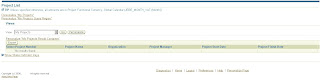
1. Open an OA Page, where would you like to Disable/Modify the OA Footer.
If you need to disable/Modify for all the OA Pages, open any existing OA Page as below
2. Click on the Personalize Page button at the top of the Page, and choose the context of the Personalization as below,
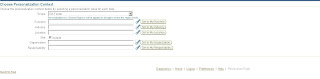
Check the corresponding options if you want to implement the change at the Responsibility or Site level. Here we have considered at the Site Level
3. Now, you could see the highlighted copyright and a pencil icon across it, clicking on it we can personalize the OAFooter/Copyright content as needed, please click on it
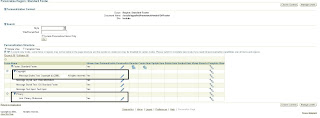
4. Modify the Rendered Property to False to Disable and modify the Additional Text for modifying the Content.

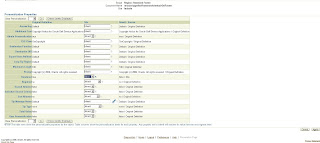
If you are representing at the site level, then make sure that the property is Inherit at the Responsibility Level, though it Disbaled at the Site level, if its enabled at the Responsibility level, the OA Footer can still be visible.
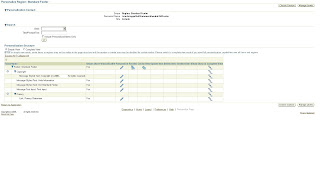 Click on Apply to make the Changes and Return to the Application to view the changes as below,
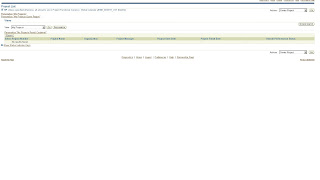 the same can be done for Diabling the Privacy statement.
Disabling OAFooter and Privacy Statement in the OAF page:
Generally sometimes client would like to replace Oracle Privacy ststement with his own and we can personalize according to client needs of modifying/Disabling the OAFooter and Privacy statement as below,
For this First, make sure that the Personalize Page Link exist on top of all OA Pages, if not please set the following profile options to enable it,
Personalize%Self%Serv%Def% : Yes
Now, after doing that we shall proceed to Disable/Modify the OA Footer:
1. Open an OA Page, where would you like to Disable/Modify the OA Footer.
If you need to disable/Modify for all the OA Pages, open any existing OA Page as below

2. Click on the Personalize Page button at the top of the Page, and choose the context of the Personalization as below,

Check the corresponding options if you want to implement the change at the Responsibility or Site level. Here we have considered at the Site Level
3. Now, you could see the highlighted copyright and a pencil icon across it, clicking on it we can personalize the OAFooter/Copyright content as needed, please click on it

4. Modify the Rendered Property to False to Disable and modify the Additional Text for modifying the Content.


If you are representing at the site level, then make sure that the property is Inherit at the Responsibility Level, though it Disbaled at the Site level, if its enabled at the Responsibility level, the OA Footer can still be visible.
 Click on Apply to make the Changes and Return to the Application to view the changes as below,
 the same can be done for Diabling the Privacy statement.
Wednesday, January 6, 2010
Oracle Forms FAQ
FORMS60_PATH setup:
Generally at client side, there could be a big hassle extractingthe forms executable file fmx from the form, due to wrong pointer of FORMS60_PATH. The FORMS60_PATH should be pointing to $AU_TOP/forms/US; $AU_TOP/resource as below
FORMS60_PATH=$FORMS60_PATH:$AU_TOP/forms/US:$AU_TOP/resource
export $FORMS60_PATH
And generate the fmx with the following command,
f60gen module=XXXXXXX.fmb userid=apps/apps module_type=FORM batch=NO compile_all=YES
Print This Post
Generally at client side, there could be a big hassle extractingthe forms executable file fmx from the form, due to wrong pointer of FORMS60_PATH. The FORMS60_PATH should be pointing to $AU_TOP/forms/US; $AU_TOP/resource as below
FORMS60_PATH=$FORMS60_PATH:$AU_TOP/forms/US:$AU_TOP/resource
export $FORMS60_PATH
And generate the fmx with the following command,
f60gen module=XXXXXXX.fmb userid=apps/apps module_type=FORM batch=NO compile_all=YES
Print This Post
Thursday, July 30, 2009
Oracle Project Contracts
I will try to cover all the portions of Project Contracts in this small document,
Why and What is Project Contracts ?
Oracle Project Contracts support complex project contract management needs of project driven organizations including commercial and government contractors, agencies and subcontractors characterized by,
Contract Creation
Contract can be created either manually or can be copied from the existing contract, where we copy all the attributes, options of the corresponding contract as shown in the initial form below,
Contracts Super user -> Contract organizer -> New Document

And on Clicking the Next button, please enter the corresponding contract attributes and click Finish button,

Contracts similar to most of the data model objects have a header and a line storing the corresponding items.
This creates a contract header as shown below,

You need to enter the fields’ come-into Force date, Owning Organization, Project and the rest all mandatory details.
For the contract to provide Billing, In the Financial list of the Contract header Check the Definitized or Bill Without Definitized Check boxes.

And enter the contract line by clicking on the Contract Line Tab and clicking o the Add (+) button in the menu.

Also make sure that the Billable Check box is checked for creating billing events and Shippable, which is used for shipping the items to OM.
Contract Header Tables,
OKE_K_HEADERS : This stores data related to only Oracle Project Contracts
OKC_K_HEADERS_B: This is the Contract Core base table upon which OKE_K_HEADERS is built and both have one to one relationship.
Contract Lines Tables,
OKE_K_LINES : This stores Line data related to only Oracle Project Contracts
OKC_K_LINES_B : This is the Contract Core base table upon which OKE_K_LINES is built and both have one to one relationship.
And here after creating the header and line with/without items, Change to the ‘Administration’ tab where we should make our self as the Contract Administrator to own the rights of the contract.
For this, we need to be,

Approve and Sign the document through the Contract Approval Workflow process in the Workflow Administrator Web Applications responsibility.
Once the contract Approval Workflow is approved, the contract status is modified from ‘Entered’ to ‘Active’, and the contract becomes ‘Active’ as shown below,

And now, on clicking the ‘Go To’ button as we have associated our self a ‘Contract Administrator’ privileges, we would be able to see the list of associated functions for the contract as shown below,

And if we select ‘Authoring Workbench’, it displays the contract workbench as below,

Contract Funding, Fund Allocations and Agreements
Funding: Funding for the Contract is done in Oracle Project Contracts, and funding for the Project is done in Oracle Projects
For the Funding to be done at the contract level, there should be a funding source determined by ‘Fund By’ in the ‘Parties and Contacts’ Tab of Contract Authoring Workbench as below,

And now we shall navigate to Funding
Contract Organizer (00001) --> Got To --> Funding Workbench


And proceed by clicking 'Next',

Now, enter the details of funding the contract from the parties specified in previous section.
The customers who have been assigned the Fund by authority can only fund the contract.
Once the funding had been created for the contract, we need to create allocation to the respective contract Header/Line and the project associated,
Click the Allocations Button, and enter the contract header. Line and amount to allocate

Now, once entered Create agreement by clicking the Create/Update Agreement button, this created entries in PA.

Here we have created funding and transferred the same to PA as agreement.
Managing Contract Billing
For creating the Billing, we need to have the deliverables.
For creating the deliverables, we can ‘Default the deliverables’ or create manual deliverable. Lets default the deliverable as
Action --> Default Deliverable


Once the deliverables are defaulted, you can proceed to deliverable tracking system, open the deliverables and also check that the Billable, and Ready to Bill columns are checked for the billing to be created for the associated project.

And now, we shall initiate billing for the events to the projects,
Go To --> Deliverable Based Billing --> Find --> View Events --> New
Enter the Event Type, Billing Task and initiate the Billing,


Now, we could see the event being transferred to Projects(PA), and we shall see the same in PA,
Project Billing Super User --> Billing à Events --> Project --> Find Project 100000489

Open the event,

Transfer Contract entries to AR Invoice
Oracle project contract entries can be transferred to AR by running the following programs in the specified order and with the following mandatory steps,
Mandatory steps for creating the Sales order Invoices in AR from PA events,
Base-lining the project funding:
Project Superuser -> Billing -> Funding Enquiry -> Click on Baseline Funding

Baselining the Funding automatically enters the Revenue cost Budget.
The Approved cost budget should be entered as below,
Project Superuser -> Budgets
select Approved Cost Budget

Move to Details, enter the amount for the cost budget, save and close. Submit


Now Baseline the budget amount.

After performing the above setups, run the following programs for the project
PRC: Generate draft invoice for a single project

The output shows the details of the draft invoice.

Now, query the invoice and approve as below,
Project Status Enquiry -> Project Status Enquiry

Open the Invoices, Approve and then Release

Now, Run program PRC: Interface Invoices to receivables

The output shows the details of the invoice,

The interfaced invoice lines had to be imported to AR, and this is done by program,
Autoinvoice import program as below

And the AR invoice is created as below,

The currency the invoice is created depending on the profile option 'Invoice by Bill Transaction Currency' setup at the project level.
OKC and OKE Tables

Contracts Migration API
Contract migration does not happen as the same traditional way of copying data from legacy systems to Interface tables and from interface tables to base tables because oracle does not provide any interface tables for Contracts, but of course provided some other methodology of importing data through the API.
Contracts constitutes the following data,
Contracts Access By Role
usually Contracts are not accessed by any other user unless he owns the contract administrator role assigned in the Authoring workbench.
The Contract access can be provided to any user by the contract administrator in the Contracts access screen at:
OKE Contracts --> Security --> Contract Accesses

And the access can be provided of these following roles,
--> Contract Administrator
--> Program Manager
--> Project Accountant
--> Project Controller
- Why and what is Project Contracts?
- Contract Attributes
- Contract Creation
- Contract Funding, Fund Allocations and Agreements
- Contract Billing
- Transfer Contract Events to AR
- Shipping Contracts to OM
- OKC and OKE Tables
- Contracts Migration API
- Contracts Access By Role
- Contracts Change Management
- Contracts Status Change
Why and What is Project Contracts ?
Oracle Project Contracts support complex project contract management needs of project driven organizations including commercial and government contractors, agencies and subcontractors characterized by,
- Ever changing contract specifications
- Procure-contract components and services
- Managing Contract Billing
- Contract Funding in Multiple Currencies
- Compliance of government regulations
- Deliverable tracking integrated with ERP functions like procurement, planning and production
- Flowdown of contract information to subcontractors and prioritization of contract deliverable.
- Audit trial for all contracts
- Type: This indicates whether the contract is an Award, Bid, Proposal, subcontract etc.,
- Intent: This indicates the main objective of the contract is either to Buy or Sell. Buy is used for Subcontracted deliverable or as a customer Buy document. Sell is used for all outbound deliverable.
- Number: Number of the Contract, enabled only if document type numbering is set to ‘Manual’.
- Currency: Currency in which the contract amounts and prices are defined.
- Start Date: Start Date of the Contract
- Item Master Org: The manufacturing organization where you have defined inventory items; it is a manufacturing entity.
Contract Creation
Contract can be created either manually or can be copied from the existing contract, where we copy all the attributes, options of the corresponding contract as shown in the initial form below,
Contracts Super user -> Contract organizer -> New Document

And on Clicking the Next button, please enter the corresponding contract attributes and click Finish button,

Contracts similar to most of the data model objects have a header and a line storing the corresponding items.
This creates a contract header as shown below,

You need to enter the fields’ come-into Force date, Owning Organization, Project and the rest all mandatory details.
For the contract to provide Billing, In the Financial list of the Contract header Check the Definitized or Bill Without Definitized Check boxes.

And enter the contract line by clicking on the Contract Line Tab and clicking o the Add (+) button in the menu.

Also make sure that the Billable Check box is checked for creating billing events and Shippable, which is used for shipping the items to OM.
Contract Header Tables,
OKE_K_HEADERS : This stores data related to only Oracle Project Contracts
OKC_K_HEADERS_B: This is the Contract Core base table upon which OKE_K_HEADERS is built and both have one to one relationship.
Contract Lines Tables,
OKE_K_LINES : This stores Line data related to only Oracle Project Contracts
OKC_K_LINES_B : This is the Contract Core base table upon which OKE_K_LINES is built and both have one to one relationship.
And here after creating the header and line with/without items, Change to the ‘Administration’ tab where we should make our self as the Contract Administrator to own the rights of the contract.
For this, we need to be,
- Defined as an employee and assigned a Job in which Business unit/Organization is the contract being defined.
- And the Employee name is registered as the contact person to the Oracle Applications User.
- Assign yourself as a contract Administrator as shown below and also associate the contract Approval workflow and Start it to make the Contract Active.

Approve and Sign the document through the Contract Approval Workflow process in the Workflow Administrator Web Applications responsibility.
Once the contract Approval Workflow is approved, the contract status is modified from ‘Entered’ to ‘Active’, and the contract becomes ‘Active’ as shown below,

And now, on clicking the ‘Go To’ button as we have associated our self a ‘Contract Administrator’ privileges, we would be able to see the list of associated functions for the contract as shown below,

And if we select ‘Authoring Workbench’, it displays the contract workbench as below,

Contract Funding, Fund Allocations and Agreements
Funding: Funding for the Contract is done in Oracle Project Contracts, and funding for the Project is done in Oracle Projects
For the Funding to be done at the contract level, there should be a funding source determined by ‘Fund By’ in the ‘Parties and Contacts’ Tab of Contract Authoring Workbench as below,

And now we shall navigate to Funding
Contract Organizer (00001) --> Got To --> Funding Workbench


And proceed by clicking 'Next',

Now, enter the details of funding the contract from the parties specified in previous section.
The customers who have been assigned the Fund by authority can only fund the contract.
Once the funding had been created for the contract, we need to create allocation to the respective contract Header/Line and the project associated,
Click the Allocations Button, and enter the contract header. Line and amount to allocate

Now, once entered Create agreement by clicking the Create/Update Agreement button, this created entries in PA.

Here we have created funding and transferred the same to PA as agreement.
Managing Contract Billing
For creating the Billing, we need to have the deliverables.
For creating the deliverables, we can ‘Default the deliverables’ or create manual deliverable. Lets default the deliverable as
Action --> Default Deliverable


Once the deliverables are defaulted, you can proceed to deliverable tracking system, open the deliverables and also check that the Billable, and Ready to Bill columns are checked for the billing to be created for the associated project.

And now, we shall initiate billing for the events to the projects,
Go To --> Deliverable Based Billing --> Find --> View Events --> New
Enter the Event Type, Billing Task and initiate the Billing,


Now, we could see the event being transferred to Projects(PA), and we shall see the same in PA,
Project Billing Super User --> Billing à Events --> Project --> Find Project 100000489

Open the event,

Transfer Contract entries to AR Invoice
Oracle project contract entries can be transferred to AR by running the following programs in the specified order and with the following mandatory steps,
Mandatory steps for creating the Sales order Invoices in AR from PA events,
- The Project Funding should be base-lined.
- Approved cost Budget and Approved Revenue Budget should be entered for the project.
Base-lining the project funding:
Project Superuser -> Billing -> Funding Enquiry -> Click on Baseline Funding

Baselining the Funding automatically enters the Revenue cost Budget.
The Approved cost budget should be entered as below,
Project Superuser -> Budgets
select Approved Cost Budget

Move to Details, enter the amount for the cost budget, save and close. Submit


Now Baseline the budget amount.

After performing the above setups, run the following programs for the project
PRC: Generate draft invoice for a single project

The output shows the details of the draft invoice.

Now, query the invoice and approve as below,
Project Status Enquiry -> Project Status Enquiry

Open the Invoices, Approve and then Release

Now, Run program PRC: Interface Invoices to receivables

The output shows the details of the invoice,

The interfaced invoice lines had to be imported to AR, and this is done by program,
Autoinvoice import program as below

And the AR invoice is created as below,

The currency the invoice is created depending on the profile option 'Invoice by Bill Transaction Currency' setup at the project level.
OKC and OKE Tables

Contracts Migration API
Contract migration does not happen as the same traditional way of copying data from legacy systems to Interface tables and from interface tables to base tables because oracle does not provide any interface tables for Contracts, but of course provided some other methodology of importing data through the API.
Contracts constitutes the following data,
- Contracts headers
- Contract Party
- Contract Contact
- Contract Terms
- Contracts Lines
- Contract Deliverables
- Contract Billing events
- Contract Funding and Fund Allocations
Contracts Access By Role
usually Contracts are not accessed by any other user unless he owns the contract administrator role assigned in the Authoring workbench.
The Contract access can be provided to any user by the contract administrator in the Contracts access screen at:
OKE Contracts --> Security --> Contract Accesses

And the access can be provided of these following roles,
--> Contract Administrator
--> Program Manager
--> Project Accountant
--> Project Controller
Contracts Status Change
The Status of a Contract is a label defining where it stands in its life cycle of the following Order:
Entered: This is the initial stage and can be completed but not approved.
Signed: Contract is approved but not yet effective
Active: Contract is Approved, Signed and Effective
Expired: Contract was active, and not effective any more.
Terminated: Contract is no longer active, either by termination from either side or by completion of all contractual obligations as specified.
Cancelled: Contract never became active and not planned to become active
The Contract status can be modified from one stage to other with the Menu Item,
Actions --> Change Contract Status
And the contract status while changing from Entered to Active the Workflows can be started using the API OKE_CONTRACT_APPROVAL_PUB.K_APPROVAL_START
And the Workflow Processes are created using API, OKC_CONTARCT_PUB.create_contract_process
Subscribe to:
Posts (Atom)


 Posts
Posts


